Artikel
How to quickly find a missing invoice for accounting
03.12.2025
When an accountant asks for a specific invoice, most people go through the same routine. First they open Gmail or Outlook, then they try Google Drive, then a few shared folders, then the download folder. Sometimes the invoice shows up, sometimes it is stored in a place no one remembers. This is a common problem in companies that use several tools every day. It is not caused by poor organisation but by the simple fact that invoices live in many different systems.
Teams often receive invoices by email, upload them to cloud storage, save them as scanned images or forward them to an accounting tool. Over time this creates scattered invoice data that is hard to search. Even a good folder structure does not protect you if the file was never placed in the right folder or if the sender used a vague filename like “invoice_2024.pdf”.
This is where modern search technology can make a real difference. Instead of manually checking inboxes and folders, you can use one central place that understands your documents. Tools like everfind index emails, PDFs, scans and cloud files and let you search them in a Google like way. You can simply type what you remember, for example “invoice from February for our web hosting” or “invoice from Company X with amount 89 euro”. Natural language queries make the process faster and remove the need to remember exact file names.
Why traditional search often fails
Most systems do not read the content of your files. When you search your drive, it only looks at file names. When you search your mail, it struggles with attachments. Accounting tools often only contain invoices that were manually forwarded or uploaded. As a result, you get incomplete results and the invoice may seem missing even though it exists somewhere.
Another common issue is the format of invoices. Some are PDFs, some are scanned images, some are pictures sent via mobile phone. Without OCR or AI based indexing, these files stay invisible to normal search.
everfind solves this by reading the text inside each file, even inside scans. After indexing, every invoice becomes searchable through simple questions. This alone can reduce the time spent on invoice hunting by a large margin.
How to search smarter with natural language
Instead of searching for exact filenames, you can describe what you need. This matches how people actually think and how they use search engines like Google. For example:
“Find the invoice for the January subscription renewal”
“Show me the invoice sent by CloudHost last spring”
“Search for all invoices above 500 euro from 2023”
In everfind these queries work because the AI understands context, dates and attributes. It turns natural language into structured search so you get the right file in seconds.
Improve your workflow without changing your habits
The best approach is not to force people to follow strict naming rules. Instead, let the system adapt to the way they work. Once all emails, drives and cloud accounts are connected to everfind, the tool automatically keeps the documents indexed. You do not have to teach the team new processes. You only offer them one place where everything can be found faster.
This creates long term advantages for accounting, tax preparation and audits, because all invoices stay accessible and searchable across tools.
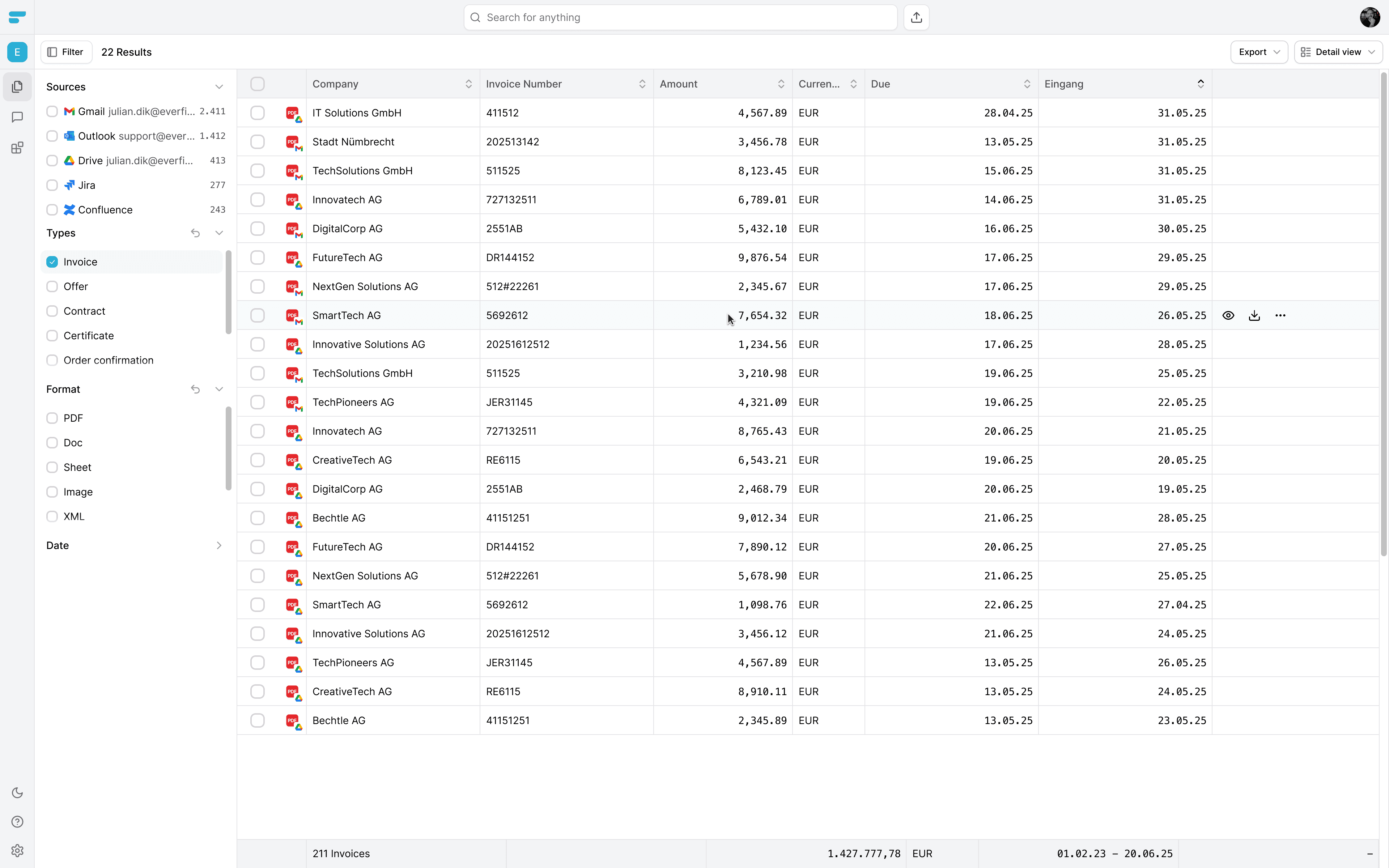
With everfind all your invoices will be viewable within one large table.
Final takeaway
Searching for a missing invoice does not have to be frustrating. The issue is rarely the user. It is the amount of places where documents are stored and the limitations of standard search tools. With an AI powered workspace like everfind, companies can find invoices and other accounting documents in seconds using natural language and a Google like search experience.
If you want to reduce the time you spend looking for invoices, you can start for free at everfind.ai.